
Your screenshots never leave your browser
By Gauthier Huguenin · Last updated
ScreenPolish processes every image entirely in your browser: import, editing and export all run on your device, and no image byte is ever sent to a server. You don't have to take our word for it — here is how to verify it yourself in 30 seconds.
The 30-second proof
With the developer tools your browser already has:
- Open the editor, then open DevTools (F12, or Cmd-Option-I on macOS) and select the Network tab.
- Drop a screenshot into the editor, style it however you like, and export it.
- Read the request list. You will see the page's own assets and, if you are signed in, small JSON calls that check your export allowance — and zero uploads: no request anywhere carries your image, because the file is decoded, rendered and encoded by the browser itself.
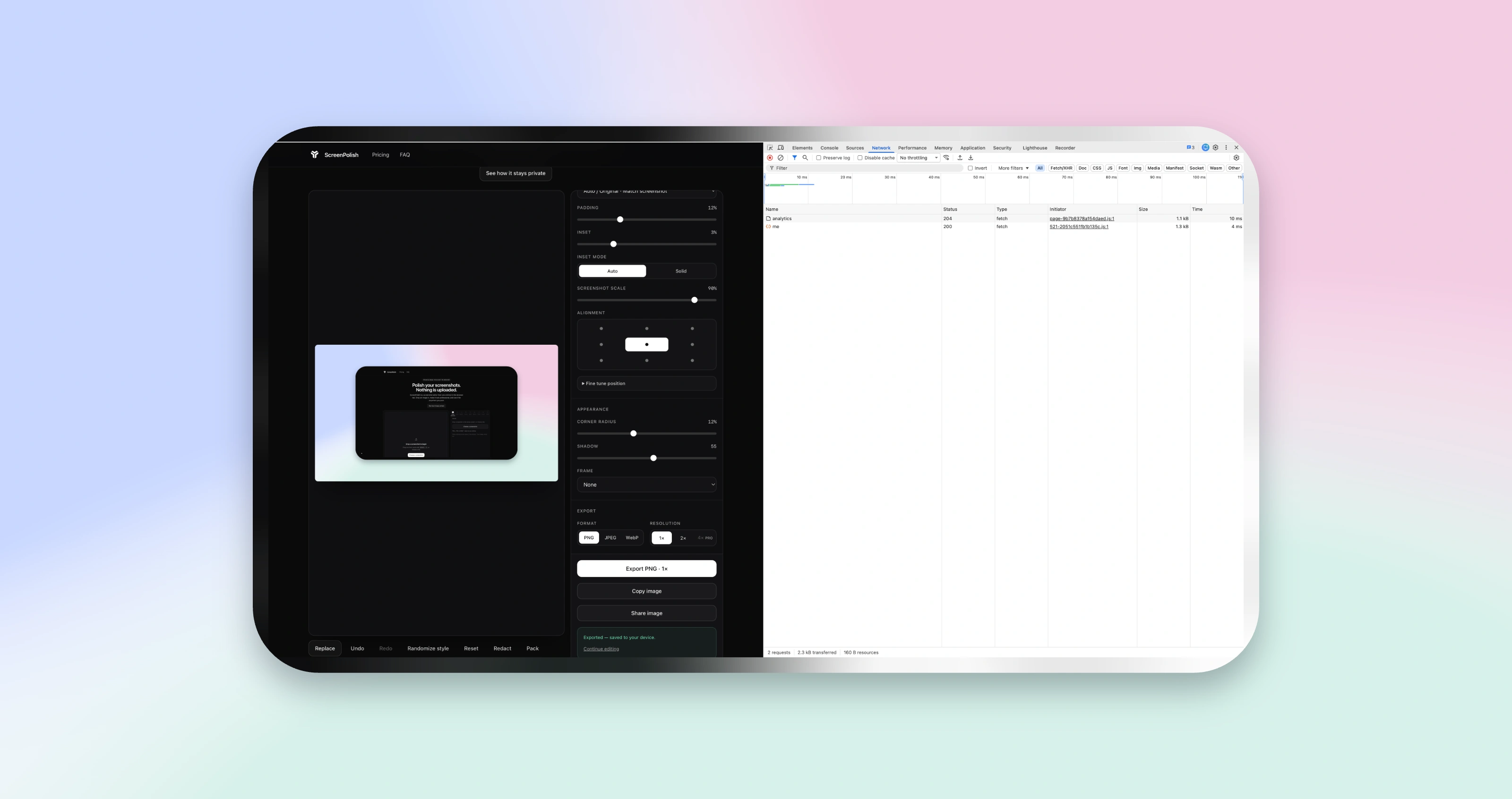
analytics and me, both of type fetch. No image request or upload appears. Select the image to inspect it at full size.Prefer the blunt version? Open the editor signed out in a fresh private-browsing session, before using its one local demo export. Turn on airplane mode, then drop an image in, edit it, and export it. Everything still works with the network gone, because the network was never part of the image pipeline. The one honest caveat: when you are signed in, the browser first asks the server for your remaining allowance before a download — a JSON call about a number, never about the image — so the offline test is for the anonymous editor while its local demo allowance remains. A tool that uploads your screenshot cannot pass it either way.
Our end-to-end suite also checks the anonymous PNG export used in this proof and fails if that tested flow sends recognizable image bytes to a same-origin endpoint.
Why we built it this way
Screenshots are rarely as harmless as they look. They carry customer names, internal dashboards, revenue figures, draft copy and unreleased interfaces — and the habit of pasting them into whatever online tool ranks first means handing that content to a server you know nothing about. ScreenPolish exists because its maker kept doing exactly that with client dashboards, and stopped being comfortable with it.
Uploading was never technically necessary. Every modern browser can decode, composite and re-encode images on its own; a server adds latency, cost and risk to a job your laptop does in milliseconds. Local-only is not a premium feature here and not a mode you must find and enable — it is the only way the product works, for everyone, on every plan.
What the server does see
Honesty cuts both ways: ScreenPolish is not "no server", it is "no images on the server". If you create an account, the server stores your email, sign-in records and sessions; it meters your authenticated exports per calendar month as the normal-use entitlement gate and the source of truth for the remaining count shown in the editor. The download itself stays client-side, so this check is not cryptographic enforcement and a determined user can bypass it. If you subscribe, Stripe processes the payment and we keep the subscription state. A first-party counter also keeps daily totals for editor opens and completed exports, split only by whether the visitor was signed in. If the optional self-hosted analytics is enabled, it records the hostname, sanitized public page path or event name, screen size, language, browser, operating system, device type, approximate location, and visit timing. It processes the IP address and user agent to create a temporary rotating visit hash and estimate location, but does not retain the raw IP address. What the server never holds, for anyone: a gallery, an image history, thumbnails, filenames, or anything image-derived at all. The privacy policy spells each record out.
Questions to ask any screenshot tool
These apply to every tool in this category, ours included. A trustworthy product should answer all five without hedging:
- Does editing work offline? If the editor breaks in airplane mode, your image is going somewhere.
- What appears in the network tab during an export? Watch it once — it is the one answer marketing cannot rephrase.
- Where is the image stored after you close the tab? If there is a gallery or history you did not create, there is a copy you do not control.
- What does the privacy policy say happens to uploaded images? If images are uploaded, look for retention periods, processing locations and third-party access.
- Can the vendor see your screenshot at all? Not "do they promise not to look" — can they, architecturally.
ScreenPolish's answers: yes, editing works offline; the network tab shows no request carrying the imported image; nothing is stored anywhere after the tab closes; no image is ever uploaded to be retained; and no — we cannot see your screenshots, because they never reach us.